Music Library
In order for Better Piano Practice to recognize the pieces that you practice, they must be added to your Music Library. You can either upload your own music, or add public domain pieces from our library. You can also configure which pieces will be actively recognized during practice sessions. To view your Music Library, click on the "Music" tab in the top bar.
Your Music
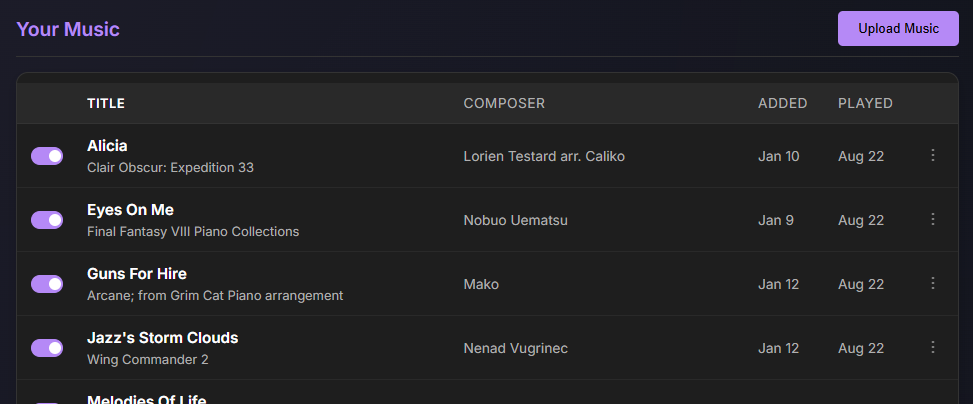
In this section, you can upload your music and manage the music that you've uploaded. Music that you upload can only be used by you; it cannot be accessed by other users of the service. Uploaded music must be in a supported format.
- MusicXML is the preferred format. It is widely supported, can be exported from most notation software, and can be downloaded from platforms like MuseScore. Both compressed and uncompressed formats are supported.
- MIDI is supported, but with significant limitations. MIDI pieces do not show notation during practice or playback, and may be matched to your playback less precisely especially if the piece contains trills or tremolos.
- PDF is not supported; you will need to use a 3rd party tool to convert the PDF to MusicXML. We've personally used Soundslice [https://www.soundslice.com] for this purpose with decent results.
Public Domain Pieces
Clicking the "Browse Public" button, on the right of the "Public" section, allows you to add public domain music in our database to your music library.
Many of these pieces come from the public domain PDMX dataset [https://github.com/pnlong/PDMX/]. To comply with applicable copyright law, only classical pieces published prior to 1930 are generally included (the full PDMX data contains many public domain arrangements of copyrighted music).
If you find a piece in the public library that is of poor quality, or that you believe is not public domain, please contact us at [support@betterpianopractice.com]. Similarly, if you have a good public domain arrangement of a public domain piece that you feel should be added to the library, please let us know!
Enabling and Disabling Tracking
The toggle to the left of each piece allows you to enable or disable tracking for that piece. Only pieces that are enabled will be recognized during practice sessions.
If your music library has too many active pieces, this can make tracking slower and/or less accurate with possible false positives. This is especially true if you've moved from a beginner arrangement of a piece to a more advanced arrangement of that same piece; the two arrangements still likely have sections with identical notes.
It is generally better to disable past pieces vs. deleting them from your music library altogeher; disabled pieces still appear correctly on the insight pages, whereas deleted pieces do not. Past practice sessions are never modified by disable or deleting pieces.