Insight
While reviewing a single practice session can be useful, especially with a teacher, one of BPP's main benefits is gaining insight across multiple practice sessions. This is done from the Insight view, which visualizes overall practice, and allows you to drill down into specific areas.
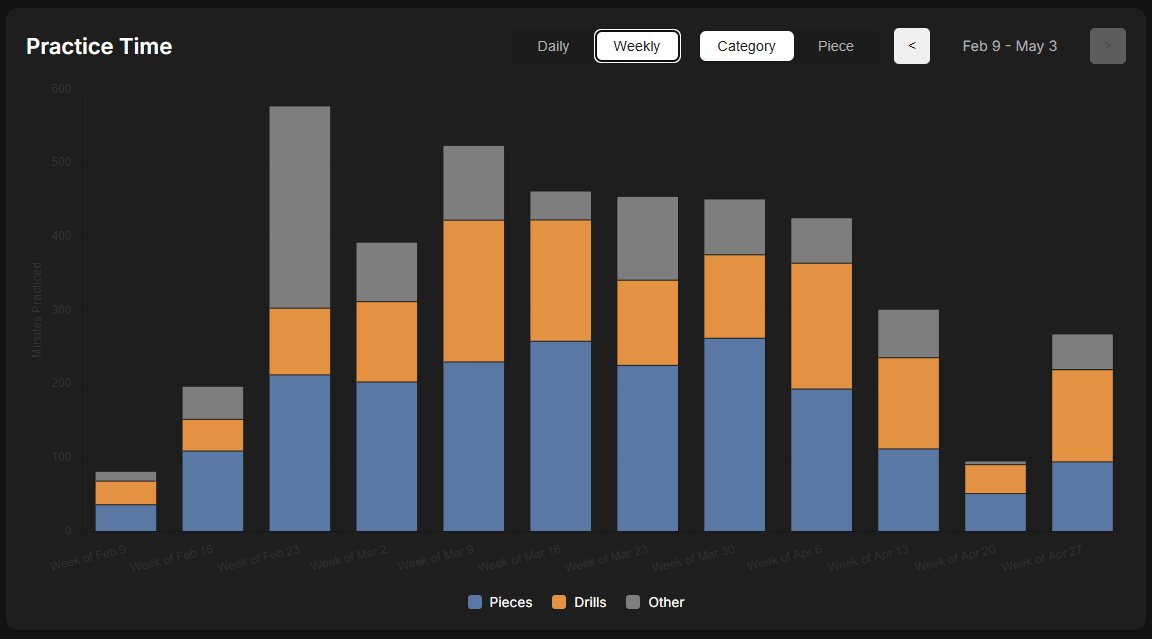
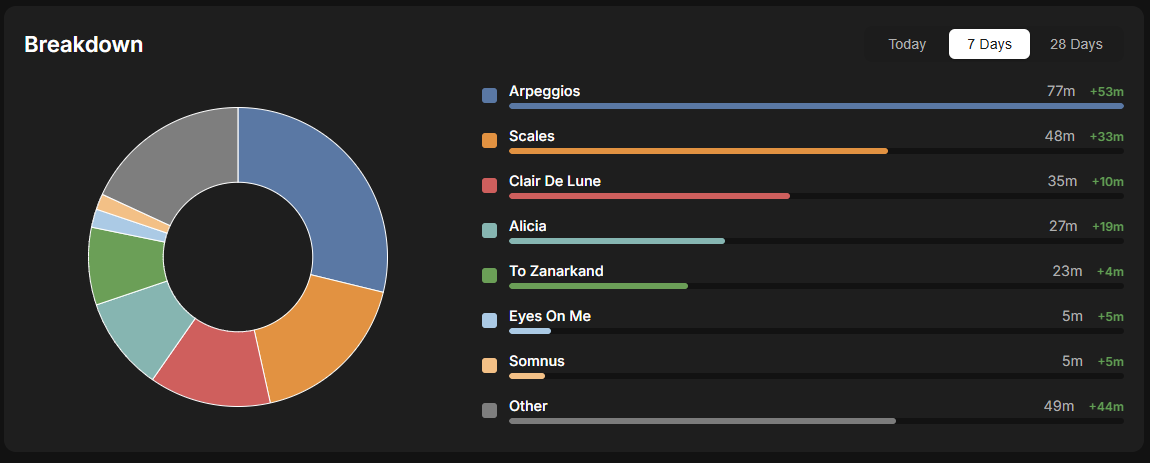
The "All Practice" view, shown above, includes all practice with the "Other" category representing play time on drills or pieces that BPP did not recognize. The drop down at the top of the view allows you to get insight on drills and pieces.
Drills
Selecting "Scales" or "Arpeggios" provides a more detailed look at those drills, in addition to total practice time.
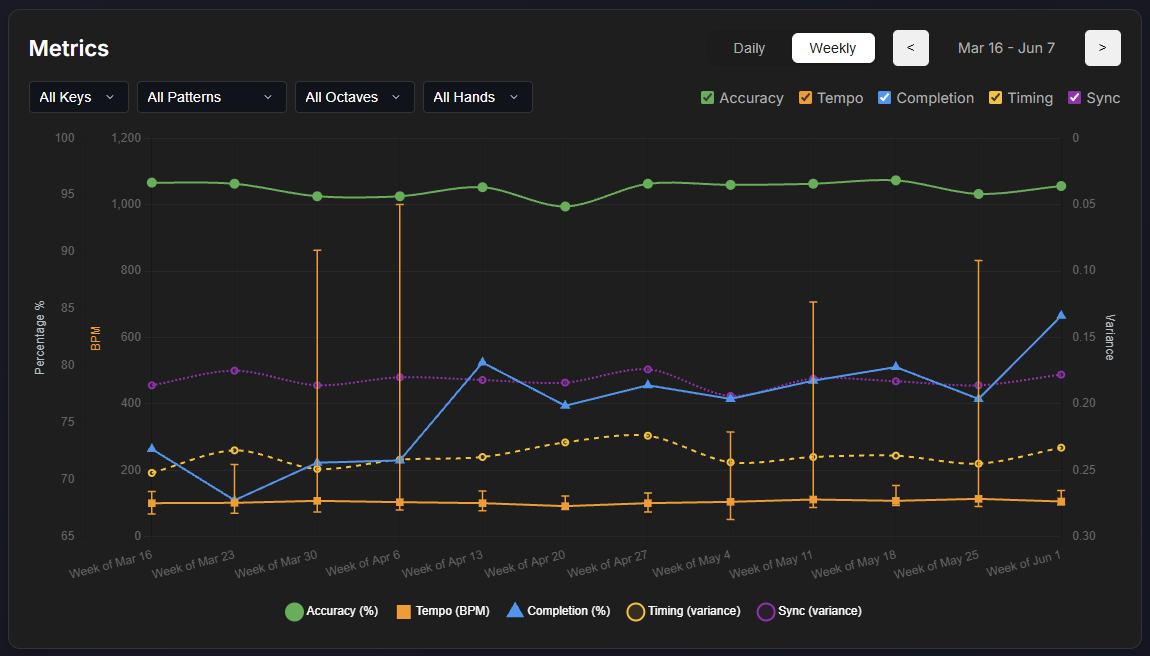
Metrics for drills are calculated as follows:
- Accuracy (%): percentage of notes that were played correctly, for completed scale & arpeggio runs.
- Tempo (bpm): tempo, in beats-per-minute (BPM), showing the 10-90% range, and the median. This is calculated assuming that single octave scales/arpeggios are quarter notes, two octaves are 1/8th notes, there octaves are 1/8th triplets, and four octaves are 1/16th notes.
- Completion (%): percentage of the time that a run was played to completion; stopping and restarting a drill counts as incomplete.
- Timing (variance): timing variation between each note in a scale/arpeggio run, as a fraction of a full interval between notes (e.g. 0.2 = 20% median variation)
- Sync (variance): timing variation between the left and right hand, for hands-together scales/arepggios, as a fraction of a full interval between notes.
I wish I could say the table above used made up data; alas, I really do play drills that badly, and only completion was improving over time.
Metrics can be filtered by key, pattern, octave, and 1-handed vs. 2-handed practice. It's a known limitation that BPP in general and these metrics in particular don't handle a number of valid drill types, e.g. polyrhythms, playing in opposing directions, etc. We hope to address those; let us know what drills you'd like to see better support for!
The breakdown table makes it easier to see the same stats as in the charts, but broken down by key, pattern, octave, and 1 vs. 2 hands. If you practice many different patterns, filtering to see only the subset you're interested in can make the table smaller.
Pieces
Selecting a piece in your music library can be used to focus on a particular piece.
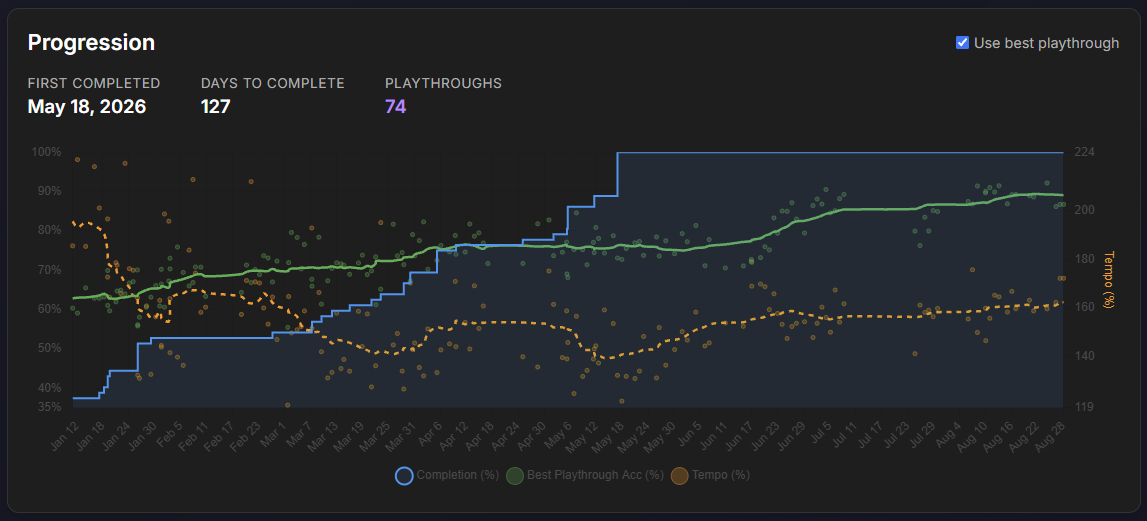
The progression chart shows progress over time, starting from the first recorded practice of a piece.
- Completion tracks progress in learning a piece; it reflects the greatest range of the piece that has been seen thus far, so it only goes up even if you focus on specific measures only during a given session.
- Accuracy shows the percentage of correctly played notes (approximately; it's weighted by measure). If "Use best playthrough" is checked, the full playthrough with the highest accuracy is used if it exists; otherwise the accuracy throughout the session is used. The line is a smoothed average across recent sessions; the small circles are the individual data points.
- Tempo shows the speed at which the piece was played, relative to the sheet music (100% = at tempo). Note that sheet music in MusicXML form often doesn't encode tempo correctly, and sometimes tempo is written using expressions - like “allegro con fuoco” - that BPP can't interpret. Your relative tempo over time is thus more meaningful than aiming for 100%, unless you are confident that tempo is accurately encoded (and interpreted by BPP).
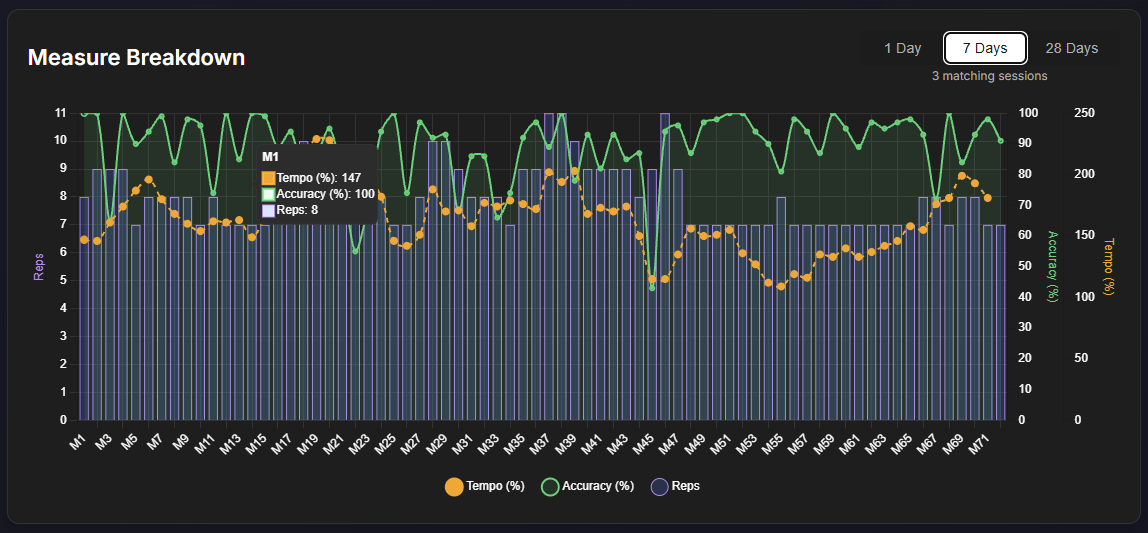
The measure breakdown splits thinsg up measure-by-measure, showing the number of times a given measure was played, and the accuracy and tempo for each measure. This can be useful at a glance for understanding what parts of a piece need focus - and for teachers to understand if their students are focusing on the appropriate parts of a piece vs. just playing the whole song through a few times.
Below this is the Recurring Issues table, which looks at the 10 most recent sessions containing the piece, and looks for recurring issues that come up multiple times.
- The filter icon next to the Recurring Issues title can be used to select what to focus on. Filters persist so you only need to set them once - but may need to reset them to see what you're looking for.
- Missing Notes flag cases where a note is present in the sheet music, that wasn't detected when the measure was played.
- Incorrect Notes refer to played notes that weren't expected; in some cases there's a guess at what the correct note was.
- Restarts are for quick jump backs within a measure, often to fix an error. These are treated distinctly from repeating entire measures, since the latter is a "good" practice.
- Fingering issues highlight where the detected finger for a note was different from what the notation expected. It's only available if video is enabled for the fingering detection feature, and it can be less accurate that other metrics especially for fast play.
- The link icon in an issue card takes you to the most recent instance detected of the highlighted issue; it opens the target issue in a new tab.
- If there's a green gradient in the background of a card, this represents progress in resolving an issue; the width of the gradient reflects the number of sessions since that issue was observed.